
Description
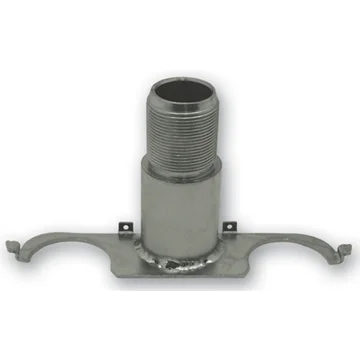
The Phoenix USA N6695 Left Hand Rear Bracket (PN6695RLBK2) is a crucial component designed specifically for the rear left-hand side of vehicles utilizing the Phoenix USA N6695 and N6695R wheel simulator kits. This bracket serves as the foundation for securely mounting the decorative wheel simulator cover, enhancing the aesthetic appeal of trucks and trailers by giving the appearance of premium wheels. Engineered for a precise fit and reliable performance, this bracket ensures that your wheel simulator stays firmly in place, even under demanding road conditions.
KEY FEATURES AND BENEFITS:
- Designated Position: Specifically designed for the rear, left-hand side of vehicles.
- Kit Compatibility: Integrates seamlessly with Phoenix USA N6695 and N6695R wheel simulator kits.
- Secure Mounting: Utilizes existing conical lug nuts and a left-hand thread center stud for a firm attachment.
- Included Hardware: Comes complete with two locking clip wires to further secure the bracket.
- Reliable Construction: Manufactured with quality materials to withstand the rigors of travel and environmental factors.
- Enhanced Aesthetics: Provides a stable base for wheel simulators, contributing to the overall visual upgrade of the vehicle.
SPECIFICATIONS:
- Part Number: PN6695RLBK2
- Manufacturer: Phoenix USA
- Position: Rear, Left Hand
- Compatibility: Phoenix USA N6695 Wheel Simulator Kit, Phoenix USA N6695R Wheel Simulator Kit
- Mounting Type: Slips under two conical lug nuts, features a left-hand thread center stud.
- Included Components: One left-hand rear bracket, two locking clip wires.
- Not Included: Jam nut.
- Material: Likely Metal (Specific material not provided in the initial details)
HOW TO USE:
- Preparation: Ensure the vehicle’s wheel is clean and the correct lug nuts are accessible.
- Positioning the Bracket: Align the Phoenix USA N6695 Left Hand Rear Bracket over two adjacent conical lug nuts on the rear left wheel.
- Securing with Lug Nuts: Carefully slide the bracket underneath the two designated conical lug nuts. Ensure the bracket sits flush against the wheel.
- Attaching the Clip Wires: Take the two included locking clip wires. Insert one end of each wire into the designated holes on the bracket.
- Securing the Wires: Wrap the clip wires around the lug studs or through designated openings (depending on the simulator design) to provide additional security and prevent the bracket from loosening.
- Mounting the Simulator: Once the bracket is securely in place, align and attach the Phoenix USA wheel simulator cover according to the simulator’s instructions, utilizing the center stud on the bracket.
- Final Check: Ensure the simulator is firmly attached and does not wobble.
BENEFITS OF USING THE PHOENIX USA N6695 LEFT HAND REAR BRACKET (PN6695RLBK2):
- Ensures a proper and secure installation of your Phoenix USA N6695 series wheel simulator on the rear left side of your vehicle.
- Prevents the simulator from vibrating, rattling, or detaching during transit, safeguarding your investment and maintaining the desired aesthetic.
- Includes locking clip wires that provide an added layer of security, offering peace of mind.
- Guarantees compatibility and the intended functionality of your wheel simulator system.
FEATURES:
- Precise Fitment: Engineered specifically for the rear left-hand side of N6695 series kits.
- Lug Nut Integration: Designed to utilize existing conical lug nuts for initial securement.
- Left-Hand Thread Stud: Features a left-hand threaded center stud for attaching the simulator cover.
- Locking Clip Wire Inclusion: Comes with two wires to further stabilize the bracket.
- Durable Construction: Built to withstand road vibrations and environmental exposure.
- Facilitates Simulator Mounting: Provides a stable and correct platform for the wheel simulator cover.

Reviews
There are no reviews yet.