
Description
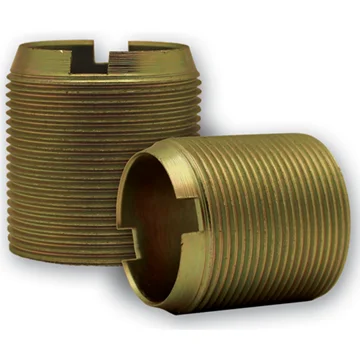
The Phoenix USA 1.4″ x 30mm Right Thread Stud Extender (PN1430RTX) is a vital component designed specifically for the secure and correct installation of Phoenix USA wheel simulator kits. This stud extender provides the necessary extension to your vehicle’s existing wheel studs, allowing for the proper mounting of the simulator covers. Engineered with precision, this part ensures a reliable and stable attachment, contributing to both the aesthetic appeal and the safety of your vehicle. It is an essential piece for completing your Phoenix USA wheel simulator setup.
KEY FEATURES AND BENEFITS:
- Precise Fit: Designed with a 30mm inner diameter and a 1.4″ height to perfectly integrate with compatible Phoenix USA wheel simulator kits.
- Right-Hand Thread: Features a standard right-hand thread, ensuring compatibility with the corresponding threads on your vehicle’s wheel studs and the simulator’s lug nut or jam nut system.
- Enhanced Installation: Provides the necessary extension to the wheel studs, making the installation of wheel simulators straightforward and secure.
- Durable Construction: Manufactured from quality materials to withstand the stresses of wheel mounting and daily use.
- Compatibility: Specifically designed for use with Phoenix USA wheel simulator kits N6559, N6640, and N6681.
- Slotted Top Design: Incorporates a slotted top, potentially aiding in the installation process or alignment with other components of the simulator kit.
SPECIFICATIONS:
- Part Number: PN1430RTX
- Height: 1.4 inches
- Inner Diameter (ID): 30mm
- Outer Diameter (OD): 1 3/8 inches (approximately)
- Thread Type: Right Hand (RH)
- Top: Slotted
- Compatibility: Phoenix USA Wheel Simulator Kits N6559, N6640 (rear application), N6681
HOW TO USE:
- Preparation: Ensure the vehicle’s wheel area is clean and free of debris.
- Locate Existing Studs: Identify the wheel studs on the vehicle’s hub where the wheel simulator will be installed.
- Thread the Extender: Carefully thread the Phoenix USA Stud Extender (PN1430RTX) onto the existing wheel stud. Ensure it is securely screwed down to provide a stable base.
- Position the Simulator: Place the Phoenix USA wheel simulator over the wheel and align it with the extended studs.
- Secure the Simulator: Use the appropriate lug nuts or jam nuts (specific to your Phoenix USA simulator kit) to secure the wheel simulator onto the newly extended studs. Tighten the nuts according to the manufacturer’s recommendations.
- Final Check: After installation, double-check that the wheel simulator is securely fastened and there is no movement.
BENEFITS OF USING THE PHOENIX USA 1.4″ X 30MM RIGHT THREAD STUD EXTENDER (PN1430RTX):
- Ensures the proper and safe installation of Phoenix USA wheel simulators.
- Provides secure thread engagement for lug nuts or jam nuts, preventing detachment during vehicle operation.
- Maintains the intended aesthetic and functional integrity of the simulator system.
- Minimizes risk of improper fit or installation errors by using the designated extender for compatible kits.
- Contributes to vehicle safety by ensuring the wheel simulator is held firmly in place.
FEATURES:
- Precise Dimensions: Engineered with a specific 1.4″ height and 30mm inner diameter for exact compatibility.
- Standard Threading: Utilizes a common right-hand thread for ease of installation and secure attachment.
- Essential for Simulator Installation: Acts as a necessary bridge between the vehicle’s wheel studs and the wheel simulator.
- Quality Manufacturing: Constructed with attention to detail to ensure reliable performance.
- Designated for Specific Kits: Tailored for seamless integration with Phoenix USA N6559, N6640, and N6681 series wheel simulators.
- Facilitates Secure Mounting: Allows for proper tightening of lug nuts or jam nuts over the wheel simulator.
Reviews
There are no reviews yet.